Tuesday, June 3, 2014

How to get The All passwords from mozilla firefox And Some Info. About Firefox

today i will show you how to get all the password , your mother,father,brother or your sister , And other Friend came on over and access to facebook . 
This isVery and extremely Easy 
Step 1 . Open The firefox . 
Step 2 . then Go into the Tools Tab
 Step 3 . then Click on the "Option" 
Step 4 . Then Go to the Security Tab , Then Click Saved passwords . Last Step 5 . Click on the Show passwords . How to avoid this tricks being used on you Do This . Go to the Security Tab Then Set a "master password" Thats All . 
Thank you very much 
-THE END- 
Mozilla Firefox is the very popular free web browser that more than 500 million people are using to surf and Browse Information in Internet . Mozilla Firefox is also available for Mac , Windows,Linux , And Other devices , and in more than 50+ different languages . You also may currently be using IE (Internet Explorer) , but Mozilla Firefox is More faster It means that you don't need to waste time waiting for Web Browser Pages to load . With a Strong Type focus on your Privacy and Online Security , Mozilla Firefox helps to protect your activities from being seen and exploited while you surf the Internet and Personal Information . Mozilla Firefox is Very well known for being the most Speed Browser And Customizable Browser . With a selection of more than 10,000 free and Unique add-ons on the Mozilla Firefox Add-ons site , you can also customize your Mozilla Firefox to your style that you want , and also functions / functioned that you want Millions people has / had stopped using IE (Internet Explorer) , and those people who have tried other browsers Like (Opera , Chrome , etc) have comeback or switch back to Mozilla Firefox for these reasons and for many more that you'll discover along the way . Mozilla Firefox is free , easy , and fun to learn and use so dont waste your time download it today . CLICK HERE TO DOWNLOAD
Any thing in this universe (specially in IT field) have lot of Advantages and also disadvantages.Today I am sharing some advantages and disadvantage of Mozilla Firefox.

The Advantages Of Mozilla Firefox 

 -It Has a better security....
 -Fast Tabbed browsing
 -Browse faster Than Internet Explorer
 -Site-specific options And Many Settings
- Extension system enhancements(plug-in) Or Add Ons
 -Updated browser appearance Many Style You Can Choose
 -Changeable Skin You Can Customize If You Want
 -Find software update, toolbar, Search enhancements
 -It HasAccessibility compliance
 -Session Restore In Just Easy Click
 -Download resuming across browser sessions, detection of signed executables (Easy To Use and Good For Surfing Internet Or Downloading Games,Software,Movies,Music, or Application)
 -search service and other options

Disadvantages 

 -It Has a Slow startup time
 -Use more memory than other browsers (It Also Depends On How Many Tabs Have You Open)
 -Other Certain websites do not render as expected in Mozilla Firefox
 - Firefox does not provide an MSI package


Internet Explorer is a extremely good web browser in many respects, but the other guys just love to hack or bombard you with nasty bugs. Butr, there is a much better browser available that's not subject to all these attacks and viruses. IE or Internet Explorer is the most popular  web browser that is used for internet surfing the net today. Users or People need a very secure and reliable web browser that will not let extremely harmful spyware and viruses invade some computers when web browsing the internet. The most widely accepted web browser as far back as everyone can remember or notice is IE or Internet Explorer. In the Web browser generation we are now seeing other web browsers enter the market like Opera , Mozilla Firefox And Others.


How To Use Google As A Proxy ?


google proxy server
Today We often use colleges and school internet connections, however they usually block the access to undesired web sites. to access those sites you can do is use the google translate as  proxy to bypass this restrictions.

Method 1

1. Visit the whatismyipaddress and note down or save you real Ip Address
2.  Then Go to Google Translate
3. From Detect Language, Chose your language
4. then type http://whatismyipaddress.com/  in text area then click on Translate
5. check your Ip Address, Its different from your real ip adress.

Method 2

1. Go to:
http://www.google.com/translate?langpair=es|en&u=www.myraretricks.blogspot.com
2. Change the text www.myraretricks.blogspot.com to the website you like to visit .
3. Thats All Done!

If you use this trick, you are not sure to protect your privacy, this kind of connection lets you see blacklisted or banned pages but does not hide your IP address.

Proxy Server

A proxy server is  another computer which serves as a hub through which internet requests are processed. By connecting through one of these servers, your computer sends your requests to the proxy  which then process your request and returns what you were wanting.  it serves as an intermediary between your home machine and the rest of the computers on the internet. Proxy are used for a number of reasons such as to , to go around restrictions such as parental blocks, to screen downloads and uploads and to provide anonymity when surfing the internet, filter web content.

Why Use a Proxy?

If you want to surf the web anonymously then proxy can provide you with a means to hide your  IP address from the rest of the world. By connecting to the internet through proxies, the  IP address of your computer will not be shown but rather the IP Adress of the proxy server will be shown. This can provide you with privacy . There are number of proxies that can provide you. You can find a list  simply by typing “Proxy List” into any search engine. There are  proxies which are free and some which charge or need money, the choice is up to you but we have found that the paid proxies are more reliable,more secure and faster.
disable N2H2

How to Setup a Proxy

 internet web browsers can be setup to run through proxy  in just a matter of minutes.

Internet Explorer Proxy Settings

  1. Click The Tools
  2. Click The Internet Options
  3. Click the Connections Tab
  4. Click The LAN settings
  5. Check the “Use a proxy server for your LAN” box
  6. Enter the IP Address of the Proxy Server and the Port Number
  7. Then Click OK

FireFox Proxy Settings

  1. Click the Mozilla FireFox Button(The button in the upper left corner)
  2. Click The Options
  3. Click The Options in the new tab
  4. Click The Advanced Tab
  5. Click The Settings
  6. Click The Manual Proxy Settings
  7. In the HTTP Proxy Box enter the  Port number and IP Address of the proxy server
  8. Click OK

Google Chrome Proxy Settings

  1. Click the Customize and Control Button(Button with the wrench picture in upper right corner
  2. Click The Under the Hood
  3. Click The Change proxy settings
  4. Click The LAN Settings
  5. Check the “Use a proxy server for your LAN” box
  6. Enter the Port Number and IP Address of the Proxy Server
  7. Then Click OK

Safari Proxy Settings

  1. Click The Safari
  2. Click The Preferences
  3. Click The Advanced
  4. Click The Change Settings
  5. Check the Web Proxy The (HTTP) box
  6. Then Enter the IP Address of the Proxy Server and the Port Number
  7. Then Click Apply Now

Proxy Detection

Are you  hidden? This provide The proxy detection at WhatIsMyIP.com. If your proxy is setup correctly you will see it’s IP address on the homepage and you also receive a message that a proxy was detected. It is impossible to detect all proxies. we do not detect your proxies but that does not mean that other websites can’t.

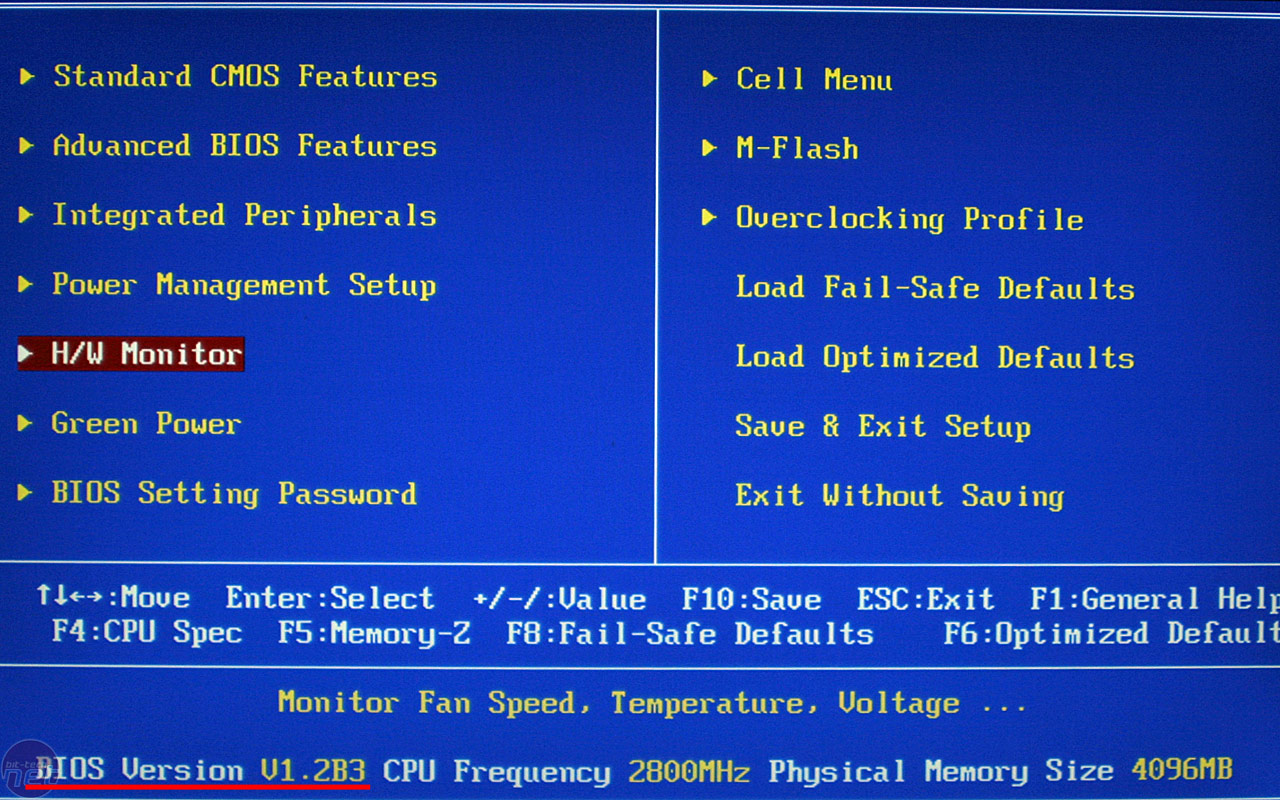
How Do I Bypass The BIOS Passwords?

How Do I Bypass The BIOS Passwords?

BIOS passwords can add an extra layer of security for laptop and desktop computers. They Used to prevent the PC from booting without a password or They are used to either prevent a user from changing the BIOS settings . However, BIOS passwords can also be a liability if a Other user forgets their password, or changes the password to intentionally lock out the corporate IT(Information Technology) department. Sending the unit back to the manufacturer or Owner to have the BIOS reset can be expensive and is usually it is not covered in the warranty. Never fear, all is not lost. There are a Many known tricks of the trade that can be used to bypass or reset the BIOS

DISCLAIMER
This article is intended for IT Professionals and systems administrators with experience servicing computer hardware. It is not intended for home users, hackers, or computer thieves attempting to crack the password on a stolen PC. Please do not attempt any of these procedures if you are unfamiliar with computer hardware, and please use this information responsibly. LabMice.net is not responsible for the use or misuse of this material, including loss of data, damage to hardware, or personal injury.


Before attempting to bypass the BIOS password on a computer, please take a minute to contact the hardware manufacturer support staff directly and ask for their recommended methods of bypassing the BIOS security. In the event the manufacturer cannot (or will not) help you, there are a number of methods that can be used to bypass or reset the BIOS password yourself. They include:

Using a manufacturers backdoor password to access the BIOS

Use password cracking software

Reset the CMOS using the jumpers or solder beads.

Removing the CMOS battery for at least 10 minutes

Overloading the keyboard buffer

Using a professional service

Please remember that most BIOS passwords do not protect the hard drive, so if you need to recover the data, simply remove the hard drive and install it in an identical system, or configure it as a slave drive in an existing system. The exception to this are laptops, especially IBM Thinkpads, which silently lock the hard drive if the supervisor password is enabled. If the supervisor password is reset without resetting the and hard drive as well, you will be unable to access the data on the drive.


--------------------------------------------------------------------------------

Backdoor passwords

Many BIOS manufacturers have provided backdoor passwords that can be used to access the BIOS setup in the event you have lost your password. These passwords are case sensitive, so you may wish to try a variety of combinations. Keep in mind that the key associated to "_" in the US keyboard corresponds to "?" in some European keyboards. Laptops typically have better BIOS security than desktop systems, and we are not aware of any backdoor passwords that will work with name brand laptops.

WARNING: Some BIOS configurations will lock you out of the system completely if you type in an incorrect password more than 3 times. Read your manufacturers documentation for the BIOS setting before you begin typing in passwords


________________________________
Award BIOS backdoor passwords:
shift       + 598598 595595 589721 589589 syxz SYXZ SKY_FOX SER pint PINT LKWPETER Lkwpeter 
KDD j322  j332 J262 J256  J64  HLT djonet  d8on Condo CONDO CONCAT  BIOSTAR awkward  AWKWARD PW  AWARD   SW AWARD  SW AWARD?  AWARD_SW aPAf _award  ALLY  aLLY ALLy ALFAROME


Ami Bios backdoor passwords:

 
LKWPETER BIOS HEWITT RAND AMI?SW AMI_SW PASSWORD   A.M.I. AAAMMMIII AMI CONDO

Phoenix Bios backdoor passwords:

 BIOS 
 CMOS ,phoenix, PHOENIX,

MISC. COMMON PASSWORDS

Wodj  biostar 
LKWPETER CMOS cmos BIOSTAR SETUP  lkwpeter setup   biosstar Syxz ALFAROME 

OTHER BIOS PASSWORDS BY MANUFACTURER

Toshiba Toshiba
Manufacturer Password
TMC BIGO

VOBIS & IBM merlin
Dell Dell
Jetway spooml

Compaq Compaq
Enox xo11nE
Biostar Biostar

Epox central
Freetech Posterie

IWill iwill
Packard Bell bell9
QDI QDI
Siemens SKY_FOX


TOSHIBA BIOS

 Toshiba laptops and some desktop systems will bypass the BIOS password if the left shift is held down during boot

IBM APTIVA BIOS

Just press the both mouse buttons repeatedly during the boot


--------------------------------------------------------------------------------

Password cracking software

 software can be used to either crack or reset the BIOS the chipsets. If your PC is locked with a BIOS admin password that will not allow access to the floppy drive, these utilities may not work. Also, since these utilities do not come from the manufacturer, use them at your own risk.

RemPass

!BIOS (get the how-to article)
KILLCMOS

Cmos password recovery tools 3.1
--------------------------------------------------------------------------------

Using the Motherboard "Clear CMOS" Jumper or Dipswitch settings

Many motherboards feature a set of 
dipswitches  or jumpers  that will clear the CMOS and wipe all of the custom settings including BIOS passwords. The locations of these dipswitches / jumpers    depending on the motherboard manufacturer and ideally you should always refer to the motherboard or computer manufacturers documentation. If the documentation is unavailable, the dipswitches / jumpers can sometimes be found along the edge of the motherboard, next to the CMOS battery, or near the processor. Some manufacturers may label the  dipswitch / jumper  - CLR - CLRPWD CLEAR - CLEAR CMOS - PASSWD - PASSWORD - PWD. On  computers, laptop the dipswitches are found under the keyboard or within a compartment at the bottom of the laptop.
remember to unplug your computer and use a grounding strip before reaching into your computer and touching the motherboard. if you locate and rest the jumper switches, turn the PC on and then check if the password has been clear. Then, turn the computer off and return the dipswitches or jumper to its original position.


--------------------------------------------------------------------------------

Removing the CMOS Battery

The CMOS settings on most systems are buffered by a small battery that is attached to the motherboard. (It looks like a small watch battery). If you unplug the PC and remove the battery for 10-15 minutes, the CMOS may reset itself and the password should be blank. (Along with any other machine specific settings, so be sure you are familiar with manually reconfiguring the BIOS settings before you do this.) Some manufacturers backup the power to the CMOS chipset by using a capacitor, so if your first attempt fails, leave the battery out (with the system unplugged) for at least 24 hours. Some batteries are actually soldered onto the motherboard making this task more difficult. Unsoldering the battery incorrectly may damage your motherboard and other components, so please don't attempt this if you are inexperienced. Another option may be to remove the CMOS chip from the motherboard for a period of time.
Note: Removing the battery to reset the CMOS will not work for all PC's, and almost all of the newer laptops store their BIOS passwords in a manner which does not require continuous power, so removing the CMOS battery may not work at all. IBM Thinkpad laptops lock the hard drive as well as the BIOS when the supervisor password is set. If you reset the BIOS password, but cannot reset the hard drive password, you may not be able to access the drive and it will remain locked, even if you place it in a new laptop. IBM Thinkpads have special jumper switches on the motherboard, and these should be used to reset the system.


--------------------------------------------------------------------------------

Overloading the KeyBoard Buffer

On some older computer systems, you can force the CMOS to enter its setup screen on boot by overloading the keyboard buffer. This can be done by booting with the keyboard or mouse unattached to the systems, or on some systems by hitting the ESC key over 100 times in rapid succession.


--------------------------------------------------------------------------------

Jumping the Solder Beads on the CMOS

It is also possible to reset the CMOS by connecting or "jumping" specific solder beads on the chipset. There are too many chipsets to do a breakdown of which points to jump on individual chipsets, and the location of these solder beads can vary by manufacturer, so please check your computer and motherboard documentation for details. This technique is not recommended for the inexperienced and should be only be used as a "last ditch" effort.


--------------------------------------------------------------------------------

Using a professional service

If the manufacturer of the laptop or desktop PC can't or won't reset the BIOS password, you still have the option of using a professional service. Password Crackers, Inc., offers a variety of services for desktop and laptop computers for between $100 and $400. For most of these services, you'll need to provide some type of legitimate proof of ownership. This may be difficult if you've acquired the computer second hand or from an online auction.

*******************************END***********************************


How To Lock and unlock your folder


folder1.jpg


How To Lock and unlock your folder
Procedure :1. Make a folder  and name it as “folder”
2. , open notepad and write ren folder folder.{21EC2020-3AEA-1069-A2DD-08002B30309D} and now (Notepad Menu) File>save as.
3. In ’save as’ name it as lock.bat and  save it ! (Save it on Desktop)
4.  open notepad again and write ren folder.{21EC2020-3AEA-1069-A2DD-08002B30309D} folder and now (Notepad Menu) File>save as.
5. In  ’save as’ name it as key.bat and click save ! (Save it on Desktop)
6.  double click lock.bat to lock the folder and now if you open your folder, control panel will show up
!
7. Now, double click key.bat to open the folder and  if you open your folder, you can now access your data inside the folder !
8. Lock your folder and hide the key.bat  on your hard disk or Flash Drive (USB) !
9. if you want to open your folder just paste the key.bat on desktop or anywhere and open your folder using it !

Response Code 503 "Service Unavailable" in Blogger

503 is a Service Unavailable is like a response code or also known as Page Not Found. The 503 response code is a complicated. Sometimes this happens when the main server can't deliver its host content the web users, or its means bloggers server have been widely overloaded


Who is Affected By This Response Code 503 Or Commonly Known As Service Unavailable

This big problems affects to all blogs not only a nationwide it is a worldwide. The ways to find out if you are affected is to Access or Login in Google Analytics also  known as the asynchronous tracking code. and check your traffic sources, select keyword and select search engines that brings a lot of the traffic to your blog or website, compare the data or also known facts and statistics collected together for reference or analysis with previous. A big change in your average or bounce rate time will be a very good indicator that your blog or websites had been affected by 503 Code. The Tips behind this is very simple, a people or user trying to check or view your blog or website has opened the 503 "response code" page and seize the site down and gone to another website. Because of this you will receive a One Hundred Percent "100%" Bounce rate for that keyword as good as a low time result


503 is a Service Unavailable is like a response code or also known as Page Not Found. The 503 response code is a complicated. Sometimes this happens when the main server can't deliver its host content the web users, or its means bloggers server have been widely overloaded


Who is Affected By This Response Code 503 Or Commonly Known As Service Unavailable

This big problems affects to all blogs not only a nationwide it is a worldwide. The ways to find out if you are affected is to Access or Login in Google Analytics also  known as the asynchronous tracking code. and check your traffic sources, select keyword and select search engines that brings a lot of the traffic to your blog or website, compare the data or also known facts and statistics collected together for reference or analysis with previous. A big change in your average or bounce rate time will be a very good indicator that your blog or websites had been affected by 503 Code. The Tips behind this is very simple, a people or user trying to check or view your blog or website has opened the 503 "response code" page and seize the site down and gone to another website. Because of this you will receive a One Hundred Percent "100%" Bounce rate for that keyword as good as a low time result


Understanding The Consequences And It's Problem The consequences or the result or effect of this problem are that you can begin or start to lose traffic and also your ranking in search engines. You need to know or understand that this is not a big problem of resources, this will not be fixed by getting a new server for your blogger (if it was me i would not be here or take this to talk about it )
This is a very big problem of how you blog and what we do with our own blogs


Background Back in the month of March. The engineers of Google introduced The Auto Pagination that basically Decrease and summarizes the amount of posts that a blog show on the home page, this only affect or relate blogs that most of their full posts on the home page. This comes to the problem by Blogger has proved desired effect , and Blogger are now have big problems in the spreading of certain blogs worldwide


How To Solve the Response Code 503 "Server Unavailable" on Your Blogger


Here are simple steps you could do in order to help Blogger to fix the issue

Basic Level (No Experience or skills needed)
- Give a brief statement of your posts
- Show only the most applicable post on your home page.

If you show full or whole post on your home page you have a big chance of encountering The Response Code "503" problem, as your blog is using much resources or supply from blogger to spread or deliver your blog. also an immoderate number of post on the home page ( even abridge or summarized posts) may effect in a response code 503 as there is a slow or delay with blogger loading your blog. You can opt to Show your newest or more latest post , and also include a widget with some Links to your preceding posts. This is SEO or also known "Search Engine Optimization" friendly and will decrease the total of problems you will have with your blog.

Moderate Or Medium Level (some knowledge and skills required)
- Use a simple or light template and avoid using the word "template designer" from blogger
- Use simple or light images

if you are taking a template made from the "template designer" from tab, there is a easily test that you can do to see how efficient your template is: Clean the cookies of your browser you use and open your blog ( not the dashboard of your blogger) by typing the Link in the address bar of your browser. Remember the time that it takes for your blog to load successfully and completely , then go to your blog again and compare the Time. Most of the templates made with the word you called "Template Designer" Have a low performance, mostly those that have some have a background image or java scripts.

The Images Play the most important part in saving some bites, you can use GIF format or PNG format as these are light formats of image you can also you the JPG formats but you must always estimate them to find out which the light one. PNG formats is not always the best formats. If you don't know how to change the format type of your images you can look or search on Google for GIMP; a software with many features like paint shop pro ; very easy to use also to change image formats


High level (Skills and Knowledge are required)
- Speed test using Firebug for Firefox

The best way to analyze and get a full report on the performance of your blog is by using “Firebug” for Firefox. Firebug will report a series of problems that your blog may have in order to reduce the loading time of your blog which is one of the determining factors of the 503 “Service Unavailable” error.
You will get specific reports on how your CSS is performing, where you can reduce the size of your CSS, where to put your Javascript files, and much more. Most importantly it will create a compressed version of your CSS (best performance) for you to use as well as a copy of all images in a different format, for instance if you have some JPG images, Firebug will compare the same image to other formats and will give to you the same image but under a different format saving you time in editing those images.
Advanced Level ( Knowledge and Skills are needed)

- Speed Test using Firebug for Mozilla Firefox

The Best way to examine and get a full detail or report on the performance of your blog is by using "Firebug" For Mozilla Firefox. Firebug will have detail a series of most problems that your blog may have in order to decrease the loading time of your blog which is the one commonly factors of the Response Code 503 "Service Unavailable" error
You will get specific detail on how your CSS is working, where you can decrease the size of your CSS , where to put your Javascript Files , and more. Most particularly it will make a compressed version of your CSS (Good Performance) for you to use as well as copy of all your images in different format. if you have a some JPG images, Firebug will estimate the exact image to other formats and will give to you the exact image but under a dissimilar format saving you time in editing all images.


How to know your blog visitors?


As a newbie or new blogger (webmaster) it is always Fun to know how many people are viewing your pageviews,blog/site where they coming from, which websites are mentioning , how many are coming via Search Engines (yahoo,google,etc) and what they are typing in the search bar or search engines to view or view your site.

These data are handy interms of improving your blog

If you search the Google, you will find or see hundreds of website which will track your visitors of your site/blog, But,some websites will supply information about your visitors than the others.

Take Note: One thing is ordinary for all the tracking websites. You need to register,provide the necessary details about your website/blog. Next, they will give you a code (html code) and you have to embed it in your blog/site.

How to do this in my blogger?
1. Login to your Blogger Dashboard
2. Press or click the Tab "Layout" 
3. Tick on the "Add A Page Element"
4. Choose "Javascript/html" and paste the code they gave to you and SAVE IT


your blog will be tracked and you can see your blog stats from time to time after logging in to your website

So, here are the example of good ones:


Sitemeter.com: one of the Well Known Popular Tracking Source. This is as simple as abcd or 123. Just make an account, copy the code given from your account and paste it in your site/blog as recommend above
You have also the choice to keep your blog stats secure or private
They will give you the stats on how many hits per day ,geolocation of the visitors,unique visitors, how many users online, and more..As it is simple your website will load as fast it is before.stats are updated in 60 minutes or hourly

Setup now a free account in here 


histats.com

Histats.com:Unlike the Sitemeter , this tracker website have very cool and animated counters.
animated countersanimated countersanimated countersanimated counters

Tracking of Visitors  is updated every 5 minutes.Like Sitemeter,
this is also have the choice or option to keep your site stats PRIVATE AND SECURE.
They  provide Animated and cool graphs about your visitors and fully cool and animative
Want to give a try Register today just click here.


statcounter


Statcounter.com: stats counter.It is free,fast,and quick loading
It also include invisible tracking is available and no ads on your site. all the stats are in time to time and quickly fast.it is not much animates like hitstat.com.Statcounter.com provide unique visitors,visitors activity,pageviews,keywoards analysis,search engine wars,and many more

What Are you waiting for? Give it try now just click here


The Real Of Making And Earning Money Blogging You Need to Know And Study

Everybody has a different visitor or viewers about blogging and those people who have never started or to begin a blog believe that earning money with blogging is not hard at all or simple
they think anyone can do it at anytime and  they can do as they want and perhaps that is what never agree them to start their blog. but, the true is quite different. it has never been easy or simple to earn money with blogging and probably never will be in months or years and years to come. Hence, if you are the person who blindly believe it is simple to make cash or money blogging, im going to tell you some real story and truth of earning and making money blogging.


Search Engines Optimization or also known "SEO" is Secret of earning or making Money Blogging


Peoples who are using blogs or also known bloggers think that creating a site/blog , posting some articles or content and monetizing it will make them a lot of money. But they're absolutely wrong. There is the best path to make earn or make money online. its called SEO.
We Can't ignore SEO. SEO is torch of any successful blog.Without SEO we can't make day a day income. Dont forget search engine visitors its equivalent to money.
So, spend more time on learning SEO. Remembers it's not a easily quick fix, it'll take a lot of time to boost your visitors.


You Cannot Become Rich Person In Whole 
Day or Overnight


Getting People Rich schemes have resulted in more scam website that anything else. Every Person wants to have a lot of income especially to become rich as quickly as possible because getting good and wishing for the best is in human nature
But, this nature puts us into some troubles like sscams. What you need to quickly understand while going into blogging or even if you are in blogging for a while time is that making tons of cash or money from your blog is not going to be simple easy way. it is not going to be quick as well or going to be fast. This would prove to be hard and long road where you wold have to come across a big road blocks after road blocks. You need to stay determined and focus at all times to cross the hurdles in your places and clear the path to the place where you can proudly mention yourself a "Professional Blogger"


Wealth and Success is Never Guaranteed:


Unlike some business in world, no one can ever guarantee that your business or your blog will be sucessful someday. Not even yourself. It is like a total gamble or waste of time and money because you have to put your self on hard work and everything you can into your blog to make it successful work. And, You have no idea if your blog or business is will make you money a day.

You can even spend thousands of money into promoting and starting your blogs. you can also hire professional blogger to do the whole work for you, but the true will never change. No one will ever promise that you will be successful. And, if someone mention it to you, that is a very big scam alert. that is how cruel the reality of blogging is.


You Have to Study and Learn at all times:


This is not something which you can achieve that you have a knowledge of everything. This is because there are lots of things to be learned and study in blogging and you get to learn something new every day.
That Means you have to work hard and learn non-stop (But take a rest a little bit for you to relax). There will never ever be a task where your Learning never ends or stop in blogging and that is the best of this business. experts bloggers are learning new stuff and novice bloggers 
are learning new stuff as well. There are some real stuff to show you how hard it is to make or earn money in blogging.I hope that now you know the true things of a blogger and how difficult bloggers have to work. So, what about today? Do you still believe the Old way or in other word the scam websites? Or i was able to change your knowledge a little bit in past?I am really happy to know and what your opinion to think about these points.